Mare Options menu on the Shortlist Planner
Manage the shortlist date and time slot as well as view the mare profile
The Shortlist Planner includes a mare options menu that lets you manage an individual mare's shortlisting without leaving the planner — setting her shortlist date, placing her in a covering timeslot, or opening her profile.
Before you begin: The Shortlist Planner is permission based. If you cannot see it in the app, please contact your Premier administrator, who can arrange access through Ardex Support (support@ardex.com.au).
Opening the mare options menu
1. From the Home Page, select Breeding, then open the Shortlist Planner.
2. Select the Not Shortlisted tab.
3. Tap the mare's entry. The options menu will pop up.
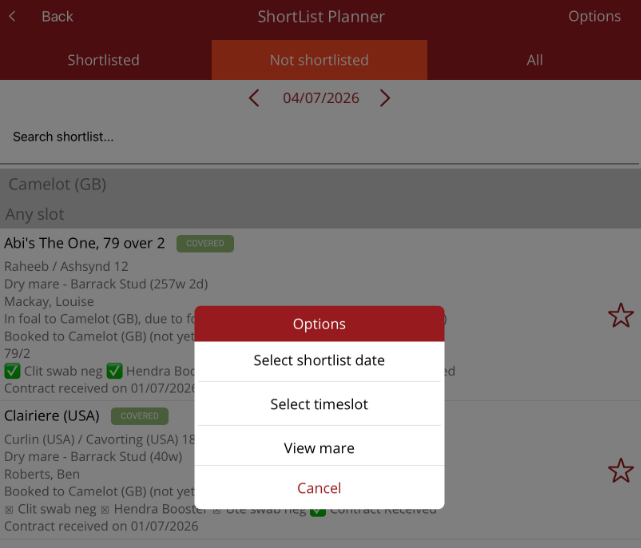
Menu options
- Select Shortlist Date — choose the date the mare is to be shortlisted for. Once a date is selected, the mare appears on the Shortlisted list in the planner for that date.
- Select Timeslot — place the mare into one of the day's covering timeslots for her booked stallion. The mare will then appear in that timeslot on the Serve Schedule.
- View Mare Profile — open the mare's profile to review her details, such as her breeding history and current status.
Additional option for shortlisted mares
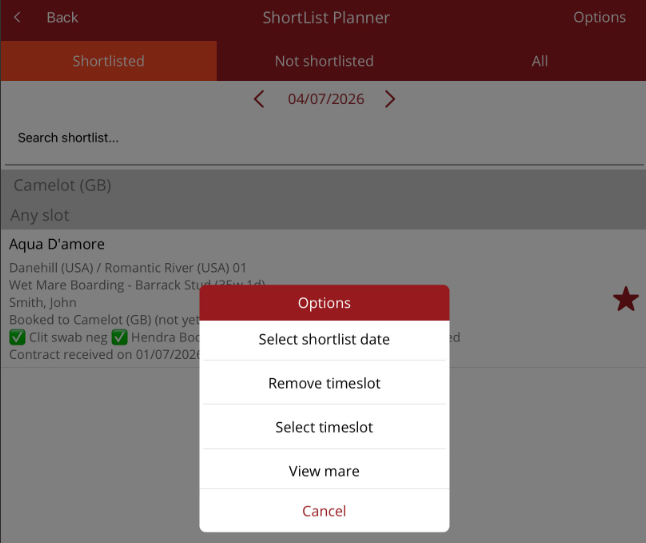
When a mare has already been shortlisted, the Options menu includes one further item:
- Remove Timeslot — take the mare out of the covering timeslot she has been allocated to. Use this when a covering needs to be rescheduled — the mare can then be placed into a different timeslot.
Tips
- Check the date at the top of the planner before selecting a timeslot — timeslots relate to the day currently displayed.
- You can also shortlist a mare with a single tap of the star on her entry — see the article How to Shortlist a Mare for both shortlisting methods.
- The Serve Schedule shows a yellow border on a stallion's timeslot when shortlisted mares are yet to be allocated — a quick way to spot mares still needing a timeslot.