Your Logo
Help Center
Go back to application
Help Center
Go back to application
New Ardex Premier Mobile
Accessing the new app
Accessing the new Premier mobile app
Setting up a new user
Adding a new user to Premier mobile app
Logging on and off the app
How to log onto the mobile appSetting a pin for log inLogging off the mobile app
Using filters in the app
Adding a Filter Adding a Practitioner filterHow to reset filters
Home Page
Home PageAlert - REF39 - what does this mean?Email prompt when logging in
Home Page Option menu
Home Page OptionsUser profileApp Info
Procedures
ProceduresProcedure ScheduleUnapproved proceduresWeightsTemperatures
Movements
MovementsHorse MovementMovement ListHow to move all horses from one paddock to another
Work
What is Work?Work Profile Horse listWork Profile Horse list - Option menuHorse Profile Current Work tabHorse Profile Previous Work tabAdd completed or scheduled work to a horseAdd multi-day procedures under horse profile current workHow to remove work from a horseHow to add a reminder for a horseWhat is the difference between work and a reminder?How to add a new work itemHow to edit a work item and link a procedureHow to view and manage procedures linked to a work itemHow to delete a work item
Media
MediaRecent mediaUpload Voice NotesUpload VideosUpload images
Reports
ReportsHow to add reports for mobile app users
Connect Scanner
Compatible bluetooth microchip scanners and set upConnecting and using the scanner to find horses
Reload Data
Reload Data
Add and manage procedures
Where can a procedure be added fromAdd a procedureHow to add a procedure to a horse or clientProcedure SettingsHow to add multiple proceduresAdding linked proceduresHow to add scheduled repeating proceduresUpdating a procedure
Calendar
Home Page calendar
Home Page Calendar
Full calendar view
Full Calendar
Agenda view
Calendar Agenda View
Calendar Options Menu
Calendar Options menu
Bottom Navigation
Bottom navigation menu
Horses
Horse ListHorse Options menuHow to add a new horseHow to check if a horse has already been addedHorse ProfileHorse OwnerHow to add a share to a horseHow to update owner's details from the Horse profile pageHow to sell shares in a horse to a new ownerHorse MediaHorse ProceduresHorse NotesHorse Racing
People
People ListPeople List Options menuHow to add a new person or entityPerson profileHow to edit a person/entity's detailsPerson HorsesPerson Notes
Quick Add Menu
Quick Add MenuQuick Add - ProcedureHorse Voice NotesHorse Progress NotesHorse VideoHorse Photo
Racing
Racing
Breeding tools
Breeding toolsBreeding
Repro
ReproWhat do the different colours for tags mean?Vet Work report in ReproBroodmare CardMare Breeding History
Bookings
Bookings
Shortlist Planner
Shortlist PlannerShortlist Planner Options menuHow to shortlist a mareMare Options menu on the Shortlist Planner
Cover Schedule
Serve/Cover schedule
Mare Scans
Mare scans
Mare Foaled
Add a mare foaled procedure via Breeding

Procedure Settings

Choose different options to add multiple, linked or repeating procedures

On the Add Procedure screen, there are three options under Procedure Settings.
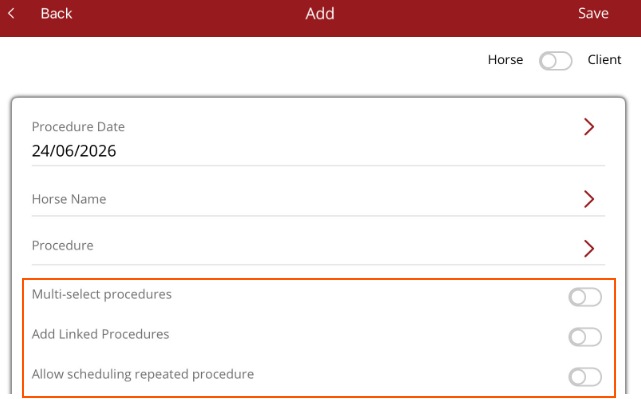
  • Multi-select procedures - select more than one procedure to be added to a horse(s)/client(s).
  • Add Linked procedures - add procedure that have been linked to the main procedure or add an adhoc linked procedure.
  • Allow scheduling repeated procedure - repeat the procedure over a period of time


Was this article helpful?

Powered by Product Fruits