Upload Videos
Upload saved videos with the option to email owners
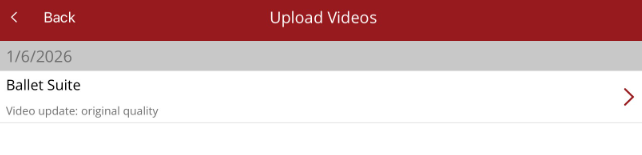
When a video is taken and then saved in the app, it will be displayed in Upload Videos under Media. You need to be connected to a WiFi network or have acces to a 4/5G network to run the upload.
When you press on the media file listed, the Options menu will appear.
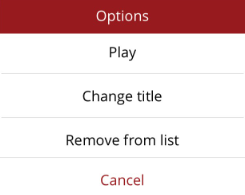
- Play - play the video (test it shows what you want)
- Change Title - change the title saved against the video
- Remove from list - remove the video from the upload list. It will not be uploaded or saved against the horse (will not be deleted from your device).
At the bottom of the screen, you have two options
- Upload and e-mail owners - video is saved against the horse and also emailed as a progress note to the owners/interested parties (recipients can click a link to view the video on a cloud server)
- Upload without e-mailing - video is saved against the horse, not sent to anyone.
Both options will upload the video and save it to the horse. Once uploaded it is available to be viewed and attached to progress notes from the Recent Media option under Media.
